What Is an Instagram Meta Account?

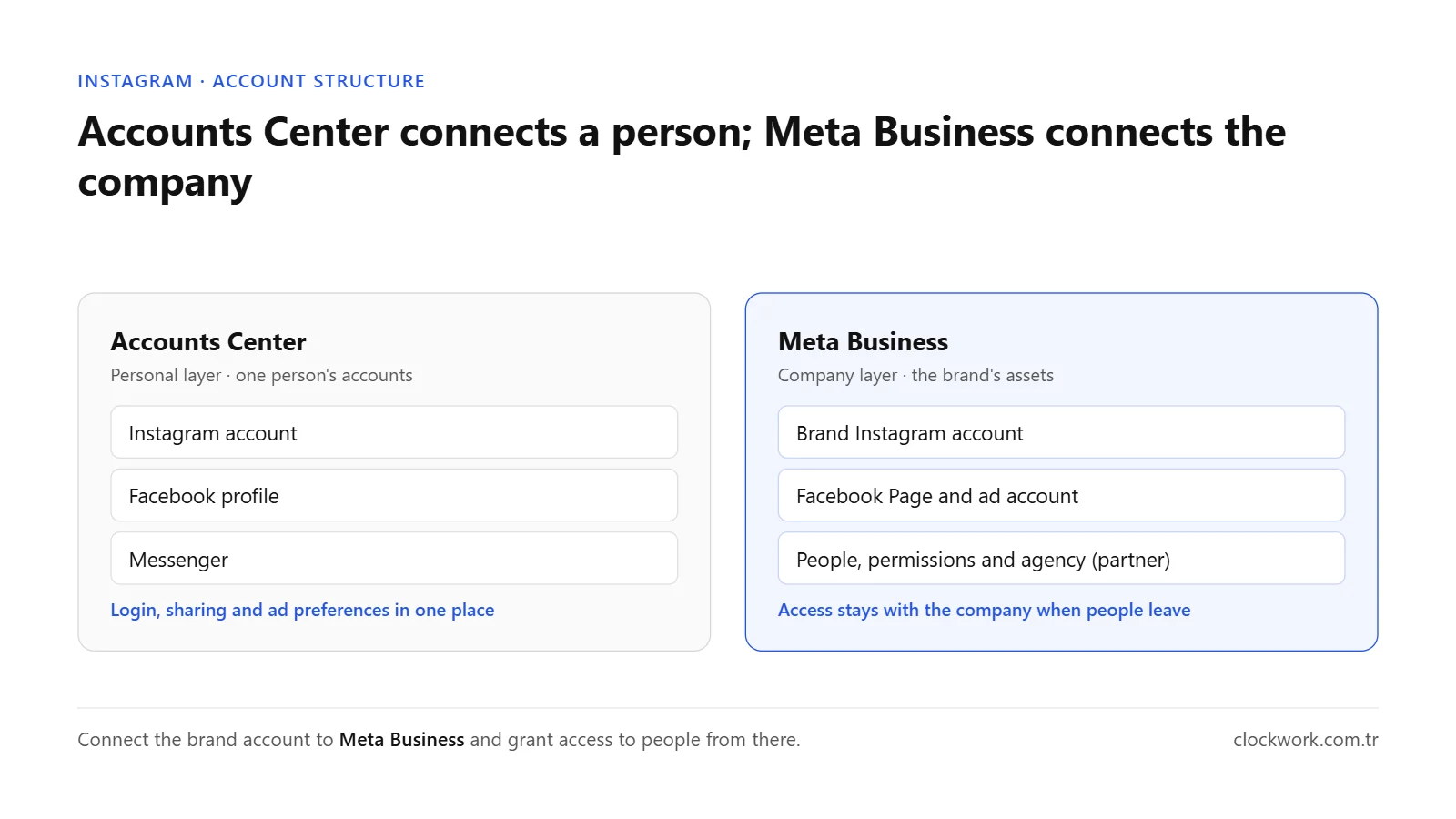
An Instagram Meta account is the shared account structure that links your profiles across Meta apps such as Instagram, Facebook and Messenger under a single Accounts Center. Your Instagram account stays separate; with Accounts Center you can manage login details, sharing settings and ad preferences together. For brands, the key point is that this is a different layer from the Meta Business account.
On Instagram, the terms "Meta account", "Accounts Center" and "Meta Business account" are often confused. The confusion usually surfaces in the first week of social media management: Who can access the corporate page, which login is the ad account tied to, and how is access closed when an employee leaves? In this article, we separate the three concepts and explain what Accounts Center does and which structure is right for a corporate brand.
Are a Meta account, an Instagram account and a Meta Business account the same thing?
No. Each does a different job and is managed by different people.
Concept | What it is used for | Who manages it | What it means for a brand |
|---|---|---|---|
Instagram account | Profile, content, messaging | The person or team who opened the account | The brand's shop window |
Meta account / Accounts Center | Linking Instagram, Facebook and Messenger accounts, login and settings | Each person, for their own account | Easier login and sharing, but not corporate permission management |
Meta Business account | Pages, ad accounts, people and agency permissions | Company administrators | The hub for corporate access and the advertising budget |
We cover the Meta Business account in detail in a separate article: What Is Meta Business? What Is It Used For?
What does Accounts Center do?
Accounts Center lets one person see their accounts across Meta apps in one place. Through connected accounts, you can:
See which Instagram and Facebook accounts are connected
Log in with connected accounts and manage sharing across them
Check password and security settings from a single screen
Update personal details and ad preferences together
You can remove the connection at any time; even after it is removed, your accounts remain separate accounts. Menu names may change with app updates.
How do I add my Instagram account to Accounts Center?
In the Instagram app, go to your profile and open the settings menu.
Find and open Accounts Center.
Add a new account in the Accounts section.
Enter the login details of the Facebook or Instagram account you want to add.
Choose which information and sharing features will work across the connected accounts.
For a corporate account, complete these steps through the access structure your company manages, not through an employee's personal account. Otherwise, the brand's access ends up tied to a single person.
How should brands set up their corporate account structure?
The foundation of a corporate setup is the Meta Business account, not Accounts Center. We recommend this order:
Open a Meta Business account in the company's name and assign at least two admins.
Connect the Instagram account and the Facebook Page to this Business account.
Give agencies and employees access through their own personal accounts, with only the permissions they need.
Turn on two-factor authentication for all admins.
When an employee or agency changes, remove their access from the Business account.
With this structure, the brand does not lose access to its accounts when someone leaves.
Professional account or personal account?
Use a professional account (Business or Creator) for a brand profile. A professional account unlocks insights tools that show content performance, as well as advertising tools; these are limited on a personal account. Check the current descriptions in the app to see which professional account type suits your brand.
Common situations for a corporate Instagram account
The difference between Accounts Center and Meta Business shows most clearly when a team member or agency changes. The table below sums up the most common situations and the first step to take.
Situation | First step | Where to do it |
|---|---|---|
The employee managing the account has left | Remove their Business access; if their personal account is connected to the brand's Instagram account, remove the connection | Meta Business and Accounts Center |
The agency has changed | Remove the old agency's partner access and add the new agency as a partner | Meta Business |
Posts also appear on Facebook | Check the cross-account sharing settings | Accounts Center |
Access to the account is lost | Follow Meta's account recovery steps; do not share the password with anyone again | Meta Help Center |
5 settings to keep your Instagram account secure
Two-factor authentication: Turn it on in the password and security section of Accounts Center; use an authentication app rather than SMS where possible.
Backup codes: After turning on two-factor authentication, store the backup codes in the company's secure password vault.
Logged-in devices: Regularly check the devices where the account is logged in and log out of any sessions you don't recognize.
Corporate email: The account's registered email should be an address the company controls, not an employee's personal address.
Connected apps: Review the third-party apps with access to the account and remove those no longer in use.
Menu names may change with app updates. For current steps, see Meta's Accounts Center guide.
Frequently Asked Questions
What does an Instagram Meta account mean?
An Instagram Meta account refers to the structure that allows users to connect their accounts across Meta platforms, such as Instagram, Facebook, and Messenger, through Accounts Center. This connection makes it easier to switch between accounts, manage login options, and share content using supported features. Connected accounts remain independent, each retaining its own username, profile, and content.
Do accounts connected through Accounts Center become a single account?
No. Instagram and Facebook accounts connected through Accounts Center do not merge into a single account. Each account retains its own identity and profile. You can also remove the connection between accounts at any time through Accounts Center settings.
What is the difference between a Meta account and a Meta Business account?
A Meta account helps individual users connect their accounts across platforms such as Instagram, Facebook, and Messenger and manage connected experiences. Meta Business, on the other hand, allows companies to centrally manage their Facebook Pages, Instagram accounts, advertising accounts, and other digital assets. For business accounts, access, permissions, and asset management should be handled through Meta Business.
Who should manage a company's Instagram account?
A company's Instagram account should not depend solely on an individual employee's personal account or access. A Meta Business portfolio should be created for the company, with the necessary administrators assigned and appropriate permissions granted to employees and agencies through this structure. This helps ensure that the company does not lose access to its brand accounts when an employee leaves or an agency relationship ends.
How do I connect an Instagram account to Meta Business?
To add an Instagram account to Meta Business, go to the business settings through Meta Business Suite and navigate to the accounts section to establish the connection. You will need access to the relevant Instagram account and must complete the required authorization steps. Menu names and connection procedures may vary as Meta updates its interface.
Is it mandatory to connect an Instagram account to a Facebook account?
No. Connecting an Instagram account to Facebook is not required to use Instagram. However, linking accounts through Accounts Center can make it easier to share content and switch between accounts using supported features. For business accounts, Meta Business connections should also be configured separately to manage advertising and account access.
Are posts automatically shared on Facebook when Instagram and Facebook accounts are connected?
No. Connecting accounts through Accounts Center does not mean that all content will automatically be shared across platforms. You need to enable connected sharing options and select your preferences when publishing content. Available options may vary depending on the content type and account settings.
Can I give an agency or employee access through Meta Business without sharing my password?
Yes. Meta Business allows you to grant individual access to employees and partner access to agencies. This makes it possible to assign specific permissions to assets such as Instagram accounts, Facebook Pages, and advertising accounts. Using role-based permissions instead of sharing passwords is a more secure way to manage account access.
Is it safe to log in using a Meta account?
Connecting accounts does not, by itself, create a security risk. However, it is important to use strong, unique passwords, enable two-factor authentication, and regularly review access permissions for connected accounts. Avoid approving access requests from unfamiliar devices or applications.
What happens if an Instagram account is disconnected from Meta Business?
Removing an Instagram account's connection to Meta Business may affect the business's management and access permissions for that account. Related functions, such as advertising management, content scheduling, and team access, may be interrupted. Before removing the connection, review the account's current management structure and the tools that depend on it.
What should I do if an employee loses access to the company's Instagram account?
First, check the administrator accounts and individual permissions in Meta Business. An authorized administrator can update the employee's access or assign permissions to another team member. Having at least two trusted administrators and managing access centrally helps prevent the company from losing control of its accounts.